Wednesday, November 20, 2013

WebGL Chrome Experiments that FAIL IN FIREFOX

Of the twenty-seven total Google Chrome experiments I tried to run in Mozilla Firefox, twenty-four have worked. The Cathedral experiment that A.J. claimed took a little longer to load in Firefox than it did on Chrome, but other than that Firefox worked just as effectively for most of these experiments as Chrome did.

The three experiments that failed for me in Firefox were: "Find Your Way to Oz", "Tron", and "Just a Reflektor".

The rest of the experiments worked in both Chrome and Firefox. Some of the experiments took longer to load in Firefox, such as the "Saint Jean Cathedral", but worked fine once they loaded.

WebGL Chrome Experiments Using Google's Chrome Browser

The Hobbit: Middle Earth
 Above is a Google Chrome experiment based on the Hobbit movies. It is a 3D depiction of Middle Earth (Dol Guldur in these screenshots). This is an online video game that can be accessed by clicking on its screenshots.


Digital Landscapes
The three screenshots above are from a Google Chrome experiment titled "Digital Landscapes." I like this experiment because there are four different landscapes you can view (I provided screenshots of my favorite three) and they have a retro, kind of 1980's look about them. Click any of these "Digital Landscapes" screenshots to go to the program. 


 Car Visualizer
The two screenshots here are from the "Car Visualizer" Google Chrome experiment. I like this program because you can design different models of cars in virtually any color you can imagine. The first screenshot is of a red Ferrari California and the second one is of a navy blue Chevrolet Camaro that I designed. Click on either of these screenshots to view the "Car Visualizer." 

Thursday, November 14, 2013

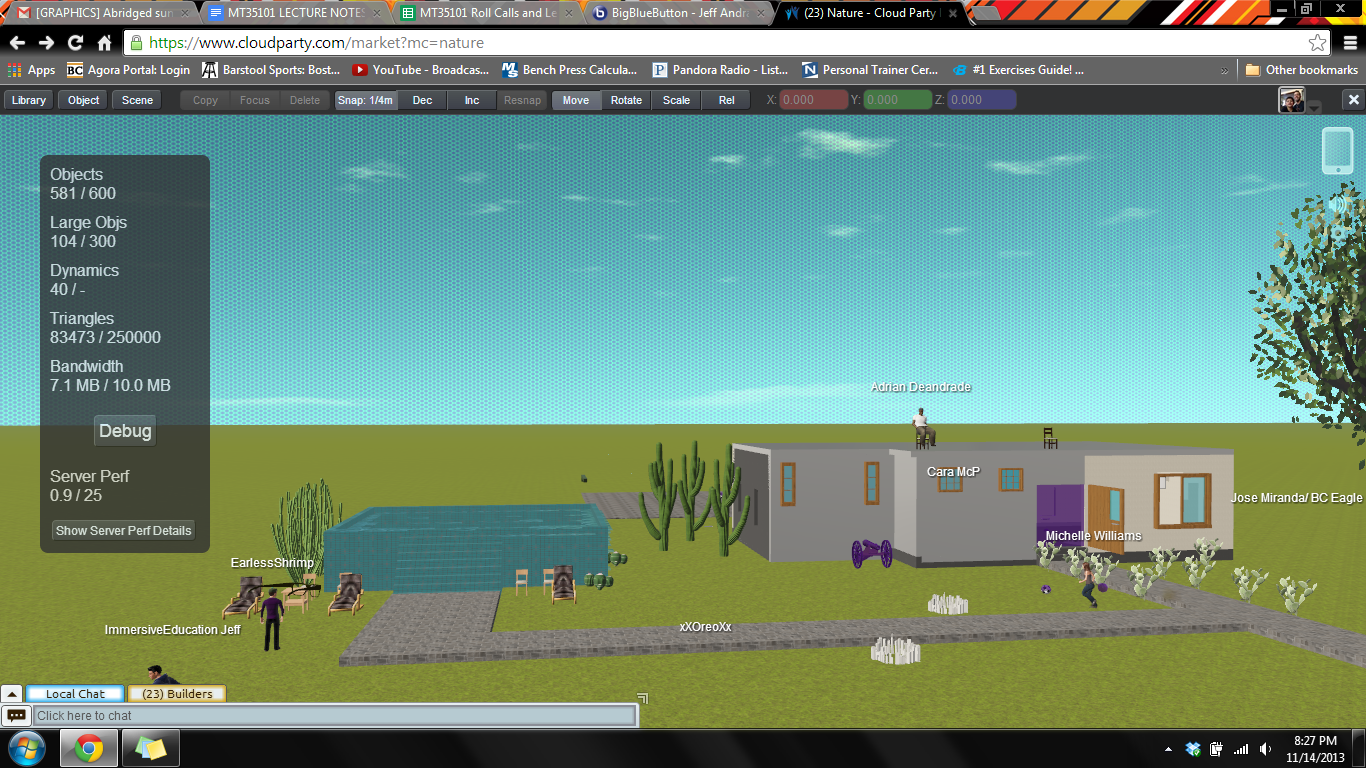
Final #3: Group 3D Building Project


Above is the third final of the Discovering Computer Graphics course. All members of the class built a house together. I worked on the pool and filled the pool with water. This is a finals exercise from the Immersive Education course I am taking at Boston College.  The course is called Discovering Computer Graphics.  For details, visit the immersive BC portal at http://ImmersiveEducation.org/@/bc.


The Education Grid


Above are screenshots of The Education Grid website (http://www.theeducationgrid.org). The Education Grid provides students of any age to information about a number a topics. All of this is made available through their website. Perhaps the best aspect of the website is that it provides all of this information for free and is available through any computer with the internet. The Education Grid website can be accessed through the link above or by clicking on any of the screenshots above.

Final 5c: My Customized Java Game

Above is a screenshot of my customized Java game made in Greenfoot. I took the game I created in Final 5b and put my face in place of the snakes and the iED logo in place of the turtle. You can play this game at the Greenfoot website by clicking on the screenshot above. This is a finals exercise from the Immersive Education course I am taking at Boston College.  The course is called Discovering Computer Graphics.  For details, visit the immersive BC portal at http://ImmersiveEducation.org/@/bc.

Below is a screenshot of my work in progress.


Final 5b: Greenfoot Lettuce and Snake


Above is a screenshot of the "Trick the Turtle" game I created on Greenfoot. If you click the shot above it will take you to the Greenfoot webpage where you can run it. In this scenario, there is one turtle who moves around eating lettuce and three snakes who move around trying to eat the turtle. This is a finals exercise from the Immersive Education course I am taking at Boston College.  The course is called Discovering Computer Graphics.  For details, visit the immersive BC portal at http://ImmersiveEducation.org/@/bc.


Below are screenshots of the work in progress.


Final 5a: Greenfoot JoC #4 Finally Some Code!

This is a screenshot of "Trick the Turtle" running in Greenfoot on my computer. I programmed the turtles using the code "move(5);turn(4);" and took a screenshot of the program running (the turtles were each running around in a clockwise circle). This is a finals exercise from the Immersive Education course I am taking at Boston College.  The course is called Discovering Computer Graphics.  For details, visit the immersive BC portal at http://ImmersiveEducation.org/@/bc.


Below are screenshots of the work in progress.